Monday, April 8, 2013

How to create a folder with NO name

This is yet another funny trick which you have tried with your  PC but might have not been successful. Here’s the way how you can rename a file or folder with NO NAME.
  1. The trick is quite simple, but can really impress your friends, simply follow these steps:
  2. Right click on the folder that you want to rename, then click“Rename” (or select the folder and press F2).
  3. When you are in edit mode press Alt+0160, and your folder will be with NO name.
At the end you should have something like this :

NB: The Reason for this is that when you type Alt + 0160 the file is named as with a blank space. When you need two folder/files without name. Keeping Alt pressed type 0160 twice – it will be renamed with two blank spaces. or you can LOOK HERE.
Share:

Saturday, April 6, 2013

How to Lock your files with a Password

How to Lock your files with a PasswordWe all have some files that we don’t want others to see, so today I will show you how to Lock and Crypt your files/folders with a Password.

If you search on the net you will certainly find many different ways to Lock your files, that’s what I found my self, and I tried many of them to choose the best.


How to Lock a Files / Folder with a Password

Now by using a simple and FREE program you can lock your folder with a password easily. The program is called DirLock and here is how to use it:
  1. Download and Install DirLock for FREE.
  2. To lock a Folder, Right click on it, then choose “Lock/UnLock”.
How to Lock your files with a Password

  1. Enter your password and confirm by clicking on “Lock”.
How to Lock your files with a Password

Now you’re done, if someone tries to open your folder, he will get an error message.
To Unlock your folder:
  1. Right click on locked folder.
  2. Click on “Lock/UnLock”.
  3. Then enter your password, and your folder is Unlocked instantly.
Share:

Trun your PC into a WiFi HotSpot


Trun your PC into a WiFi HotSpot
If you are running on Windows 7 or Windows 8 and you want to share your internet connection, you can use a simple program called Virtual Router Plus. you will learn How to Turn your PC into a WiFi HotSpot.
Virtual Touter Plus requires NO installation, simply run the application and share yout internet connection.
To do this, simply follow those steps:
  1. Download the program from HERE
  2. Unzip the downloaded file, then run the executable “Virtual Router Plus”
  3. Now enter a name (SSID) for your hotspot, and a security key (WPA2).
  4. Then select the Internet connection to share.
  5. Finally, click “Start Virtual Router Plus”
 Trun your PC into a WiFi HotSpot
You do not have to be connected via WiFi on your PC, but it is imperative to have an active wireless network card for it to work.
When sharing your connection is activated, a small notification appears:
Trun your PC into a WiFi HotSpot
And now you just have to connect to your hotspot to other devices via WiFi.
To stop sharing the connection, simply click “Stop Virtual Router Plus”.

You can also Check:
Share:

Thursday, April 4, 2013

How to Scan your files online

How to Scan your files online
If you want to scan a file but you don’t have any antivirus installed in your computer, then don’t worry you, now you can scan your files online.
VirusTotal is a free service that analyzes suspicious files and URLs and facilitates the quick detection of viruses, worms, trojans, and all kinds of malware.
How to Scan your files online

How to use Virus Total

Virus Total is an easy way to scan your files and URLs online.

Scan Files online:

Here is how to scan your files online:
  1. Visit Virus Total website.
  2. Click on “Choose File”, and select the file you want to scan.
  3. Then click “Scan it!” to submit the file.
 Now your file will be uploaded and scanned with more than 40 antivirus. 

Scan URLs online:

Here is how to scan URLs online:
  1. Visit Virus Total for URLs.
  2. Enter the URL that tou want to scan.
  3. Then click on “Scan it!”.
Now your URL will be analyzed and the result would be shown in a detailled page.
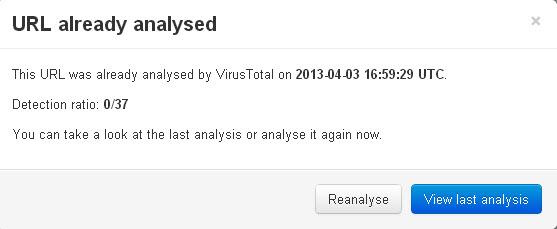
NB: If your file or URL has already been scanned previously by someone else, you will get a message like this: 
How to Scan your files online

This window tells you the date of the last report of detection and the detection ratio. From here you can rescan the file “Reanalyse” or view the full report “View last analysis”
Share:

Wednesday, April 3, 2013

How To Convert Any Files Online to Any Format


How to convert files onlineSometimes, you need to convert file extension to another extension quickly and without installing any program on your computer, if you need this, you are in the right subject matter. Whether you want to convert text files, videos, music, pictures, books, or any file, now you can do it easily.


Before, if we wished to transform file format we needed software installed on the computer, most of these programs are limited and non-free, here is a better solution.

With the Online Converter you can convert your files to any format, without any installation, it is simple and easy, effective and quick. Online Converter allows you to convert your files to any other type.

How to convert files online

  1. First enter this site Online-Convert.com and select the file type (image, video, document, audio …) which you want to convert.
  2. Choose the file extension that you want to have.
  3. Choose your file from your computer
  4. Press “Convert file”, and that’s it you’re done, the file is downloaded automatically.
Share:

Tuesday, April 2, 2013

Google Nose BÊTA the olfactory research functionality

On this early month (April 2013) Google offers you to discover the new functionality "Google Nose", a new feature in beta olfactory research. April fools of course!

With Google everything is possible, especially when it comes to trick users to April 1st.
Share:

Monday, April 1, 2013

YouTube: An April Fool's announces closure

Will YouTube close by showing the top 10 best videos posted during the 8 years of existence of the platform?

When Salar Kamangar, YouTube CEO, announces the closure of the site after 8 years of loyal service, that is realy surprising.
Share:

Labels

100000 Stars (1) 2013 (1) 360° panorama (1) 80's games (1) Air traffic (1) Airplane (1) Airplane tracker (1) Airplane traffic (1) Amazon (1) Amazon delivery (1) analyze files online (1) Analyze online (1) Analyze URL (1) Android (14) Android applications (6) Android applications on PC (1) Android codes (1) Android emulator (1) Android secret (1) Animation (1) Antivirus (1) app (11) App store (2) Apple (1) April fool's (2) ASCII Art (1) Atomes (1) audio converter (2) Augmented Reality (1) Avatar (2) Avoid spam (1) Bandwidth (1) Bank (1) Battery (1) beautiful folder (1) Best IPTV (1) Best of (1) BlackBerry (1) Block (7) Blog (1) BlookUp (1) Blue Screen (1) BlueStacks (1) BlueStacks emulator (1) Book (2) Breaking Captcha (1) bug (2) Bypass (2) Bypass Captcha (1) Bypass Captcha verification (1) Bypass SMS verification (3) Call verification (1) Camera (1) Camera Size (1) Camera Trace (1) Canon (1) Captcha code (1) Cartoon (1) Cartoonify (1) Cast (1) Change color folder (1) Change font (1) Change IP (4) change website font (1) Charge (1) Check email offline (1) Christopher Sholes (1) Chrome (2) Chrome Experiments (2) Chrome extension (4) Chromebook (1) Chromebook Pixel (1) Cloud Computing (2) Community (1) Compare tool (2) Computer (50) Computer theft (1) Convert (2) Convert files online (1) Convert image to ascii (1) Convert online (2) Corona (2) Coronavirus (2) COVID-19 (2) Create game (1) Credit Card (3) Credit Card Generator (1) Crypt (1) Delete (2) desktop shortcut (1) Detonate nuclear bomb (1) Digital Camera (2) Diposable (1) Direct download (1) Direct download torrent (1) directory (1) dirlock (1) Disconnect Facebook Messenger on Android (1) Disconnect from Facebook (1) Documents (1) Download (3) Draw on desktop (1) Draw on screen (1) Draw on windows (1) Draw on your windows desktop (1) Drones (1) Duplicate folders in same place (1) EA Sports (1) Ebook (2) Electronic video games (1) email (4) Email management (1) Emulator (1) Excel (1) Extension (2) Eye test (1) Eyesight (1) Facebook (13) Facebook chat (1) Facebook infographic (1) Facebook Messenger (1) Facebook Photo Zoom (1) FIFA (2) File (3) file converter (1) File without name (1) Find (1) Find Camera (1) Find computer (1) Firefox (1) Firefox extension (1) fix (3) Flash drive (1) FlightRadar24 (1) Folder with no name (1) Folder without name (1) Folders (2) Folders different color (1) Folders with same name (1) font (1) Fonts (1) Format (1) Free Call (3) Free International Calls (1) FREE SMS (1) FREE SMS Online (1) FREE SMS worldwide (1) Free VCC (2) Galaxy (1) Galaxy Grand 2 (1) Gameglobe (1) Gameplay (1) Games (6) Games online (1) Gmail (1) Golden Touch (1) Google (7) Google Glass (1) Google Helpouts (1) Google Hyperlapse (1) Google Nose (1) Google photos (1) Google Play (3) Google Plus (1) Google Street View (1) GPS (1) GTA (1) Hack (6) Handimation (1) Help over live video (1) Helpouts (1) Hide (3) Hotspot (1) How to (100) How to. (2) Hyperlapse (1) iCloud (1) Image (1) image converter (1) image to ascii (1) Infograghic (1) Inside submarine (1) Instagram (2) Intel (1) International air traffic in real time (1) Internet (95) Internet Connection (1) iOS (8) iOS applications (2) iphone (6) IPTV (1) Journey through Middle-earth (1) Keyboard (3) keyboard layout (1) Landscapes (1) Laptop (1) Life-size (1) Listen music (1) Listen to websites (1) Live (2) Live flight tracker (1) Lock (4) Lock file (2) Lock folder (1) Lock USB (1) Lock your file with a Password (1) Lord of the Rings (1) Lost Camera (1) Mac (5) MAC Address (1) MAC-OS emulator (1) Magnifying the Universe (1) Make game (1) map (3) Mars (1) Martian panorama (1) Martian sol (1) Media (1) message (2) Messi (1) Middle Earth (1) Milky Way (1) Most viewed (1) Most viewed videos (1) Most viewed Youtube (1) Mouse over (1) Movies (2) MS-DOS emulator (1) Museum of me (1) Music (1) nameless folder (1) Namie Amuro (1) NASA (2) Netflix (3) Network (3) Nokia (1) Nokia Lumia 525 (1) Nose (1) Nuclear (1) Nuclear weapons effects simulator (1) Nuke (1) Nuke simulator (1) Ocelot (1) Office Lens (1) Offline (1) Old OS (1) Online music (1) Operating System (1) optical illusion (1) P’9982 (1) Paint (2) Panorama (1) Password (7) Paypal (3) Paypal auto Payment (1) Paypal Payment Subscription (1) PC (1) PC to Mobile (1) Personal assistance (1) Phablet (1) Photo Zoom (1) photos (6) Photoshop (1) PIN (1) Porsche (1) Prime Air (1) Privacy (3) Private network (2) Proxy (2) QWERTY (1) Radar (1) Real-size (1) Real-time (3) Real-time air traffic (1) Rebtel (1) Receive SMS online (1) Recover (1) Remington (1) Rocknest (1) Rooter (1) Run Android apps on PC (1) Run Android apps on Windows (1) Safari (1) Safari extension (1) Samsung (2) Satellite (2) Scan (2) Scan files online (1) Scan online (1) Scan URL (1) Scan Virus (1) scheduled shutdown (1) Screen of Death (1) Scribd (1) Secret codes (1) Secret Menus (1) Secure file (1) Secure folder (1) Security (22) Seen block (2) Seen Facebook (1) Self-destruct (1) SelfishNet (1) Send FREE SMS (1) Sexy (1) Share (2) shortcut (2) Sight test (1) Simulator (3) Skype (2) Smartphone (11) SMS (2) SMS verification (2) Snap (2) Snapchat (1) Social network (8) Software (2) Soundgecko (1) Space (2) Spam (3) speed connection without software (1) Speed up connection (2) Speed up Windows connection (1) SpotAuditor (1) Spying (1) Starlink (1) Status Search (1) Steganos (1) Stolen Camera (1) Stop Motion (1) Stop spam (2) Stream (4) Street View (1) Submarine interior (1) Submarine with Google Street View (1) Surf anonymous (2) Talk Free (1) Tech (27) Temporary email (1) text to ascii (1) text to audio (1) text to mp3 (1) text to sound (1) text to speech (1) Time-lapse (2) Timelapse (2) toolkit (1) Tools (2) torrent (2) Torrent from URL (1) Torrent to direct (1) Track (4) Track computer (1) Track missing computer (1) Translate (1) Turn your blog into a book (1) Tutorials (9) two folders same name (1) Type Faster (1) Typewonder (1) Typing (1) UAV (1) Unblock (4) Unfriend Finder (1) Unfriend me (1) Universe (1) Unlock (2) unsubscribe (1) update Facebook Status (1) Update Facebook status using iphone (1) Updates (1) URL to Torrent (1) USB (2) useless (1) useless web (1) Verified (1) Verify Paypal (1) Viber (1) Video (6) video converter (2) Virtual (3) Virtual computer (2) Virtual Credit Card (2) Virtual desktop (2) Virtual museum (1) Virtual radar (1) Virtual Reality (1) Virus (4) Vision test (1) VLC (1) VPN (5) WAYme (1) We're watching you (1) Weapon (1) website (1) website fonts (1) website shortcut (1) WhatsApp (2) Wifi (1) Wikipedia (1) Windows (15) Windows folder (1) word to ascii (1) word to pdf online (1) Xlsx (1) Youtube (4) Youtube close (1) Zoom (1)